News
Exxact Validates 4x NVIDIA RTX PRO 6000 Blackwell Max-Q Workstation Edition GPUs
March 12, 2026
9 min read

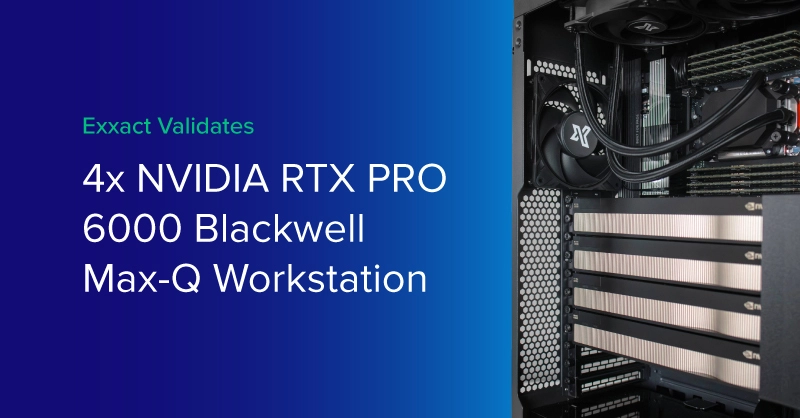
The NVIDIA® RTX PRO™ 6000 Blackwell Max-Q Workstation Edition GPU with 96GB of VRAM has made waves across all industries that value GPU acceleration and high VRAM: AI, Engineering, 3D Content Creation, Life Science, and more. With multi-GPU workstations, the deployment flexibility and performance capabilities are second to none.
With multi-GPUs workstations, we have a long-standing validation process that every Exxact solution has to clear to ensure proper cooling of the high heat components like multiple GPUs, memory modules, processors, and other components.
Validating four NVIDIA RTX PRO 6000 Blackwell Max-Q Workstation Edition GPUs in a workstation has been challenging due to a higher heat output than the previous generation. Three NVIDIA RTX PRO 6000 Max-Q were considered the thermal limit for air-cooled configurations, with other integrators resorting to liquid cooling. As of today, March 11, 2026, we still have yet to see another solution integrator offer an air-cooled 4x Max-Q configuration.
However, at Exxact, we thought otherwise. NVIDIA had designed the NVIDIA RTX PRO 6000 Blackwell Max-Q to scale to 4x GPUs in a workstation. We saw the opportunity as a challenge to offer an air-cooled 4x NVIDIA RTX PRO 6000 Blackwell Max-Q workstation. We are the first to proudly say, “We did it.”
.jpg?format=webp)
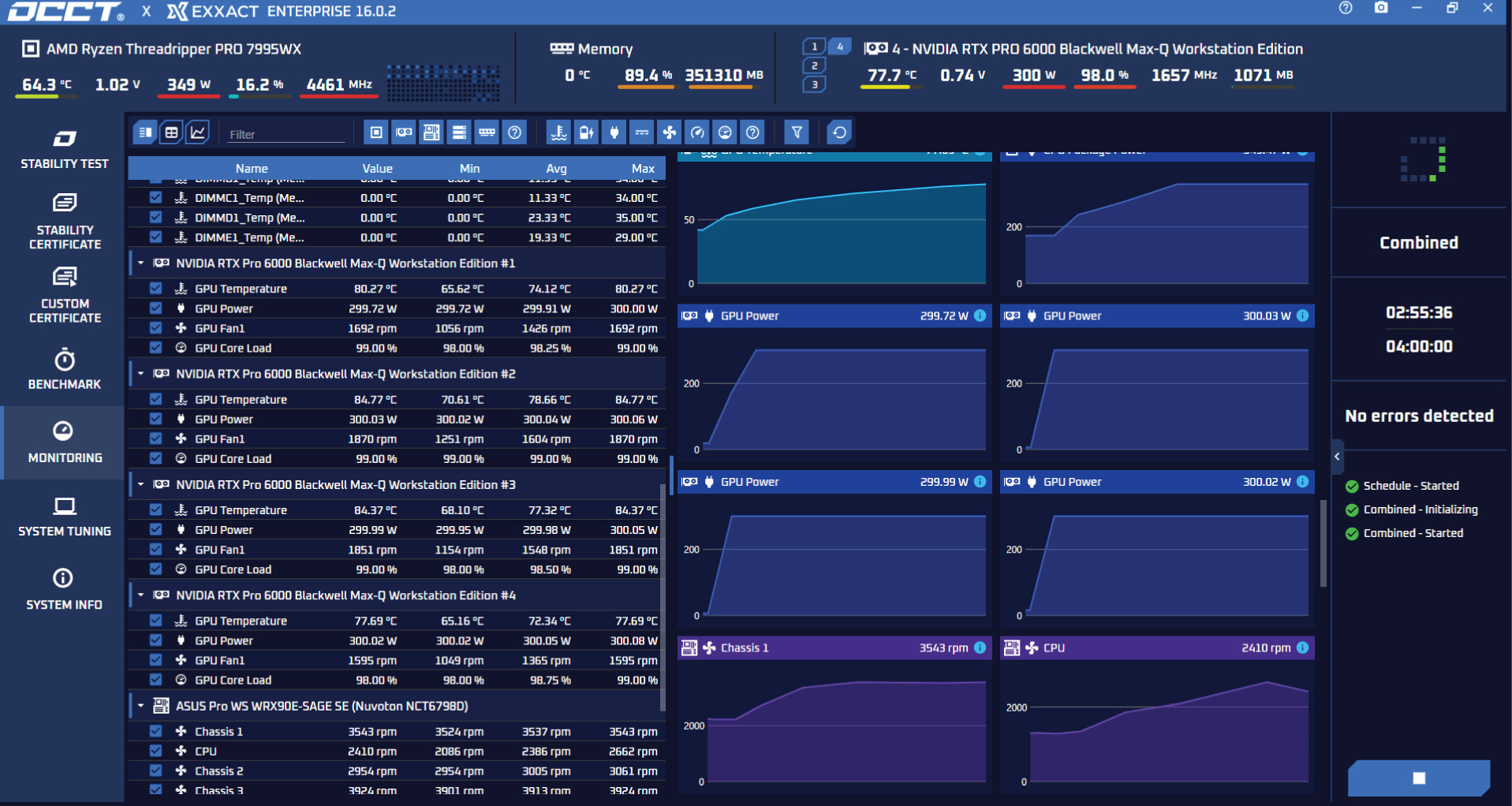
Exxact Corporation is the first to deliver a 4x NVIDIA RTX PRO 6000 Blackwell Max-Q Workstation Edition in a workstation without liquid cooling the GPUs. With careful chassis selection, airflow design, and thermal monitoring adjustments, we observed GPU stability peaking 85°C over a 3 hour OCCT stress test.
Introducing the Exxact Valence 4x Max-Q Workstation. This testing was performed on an AMD Threadripper PRO 7000WX platform with all 8 channels of memory populated. Here are the specifications of the system tested in a fixed 24°C/75°F environment with the side panels on:
| Exxact Platform | VWS-135223847 |
| CPU | AMD Threadripper PRO 9995WX on ASUS WRX90-SAGE SE |
| GPU | 4x NVIDIA RTX PRO 6000 Blackwell Max-Q Workstation Edition |
| Memory | 8x DDR5 ECC 128GB DIMMs (total 1TB) |
| Power Supply | 2500W |
In a stock configuration without the Exxact cooling solution, we also observed four NVIDIA RTX PRO 6000 Blackwell Max-Qs thermal throttling, undervolting, and leaving valuable performance (and money) on the table. However, with our custom cooling solution, each of our GPUs pulled the maximum 300W TDP with a temperature below 90°C on all four cards. This goes without saying; deploying your system in a hotter environment or restricting front, side, or rear panel airflow can adversely affect performance.
We are extremely proud of our engineering team for their ability to deliver the first validated 4x-GPU workstation featuring the extremely popular NVIDIA RTX PRO 6000 Blackwell Max-Q GPU. We ran these same tests on with great success:
We are currently running tests on the new Intel Xeon 600 workstation processor platform.
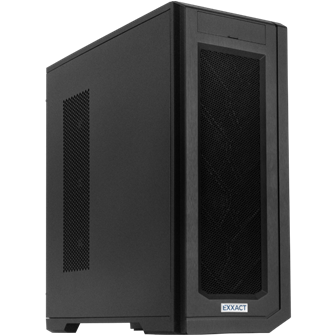
Configure our most powerful workstation platform featuring AMD Threadripper PRO 9000WX and up to 4x NVIDIA RTX PRO 6000 Max-Q GPUs. Power your workloads with the best of the best.
Build NowAir cooling is still the most practical choice for many workstation users because:
With today’s high-power GPUs, the tradeoff is that air-cooled systems must be engineered correctly. A quad-GPU build needs a chassis that supports high static pressure airflow, a fan and ducting strategy that feeds each card with cool intake air, and a thermal budget that keeps hotspots under control during sustained load.
Liquid cooling can be a good fit when you are constrained by acoustic targets and need lower fan speeds, when you need maximum thermal headroom in warmer ambient environments, or when you are comfortable with additional maintenance and component complexity.
For our validation, the goal was clear: prove 4x RTX PRO 6000 Blackwell Max-Q stability in a real workstation, with the side panels on, using air cooling. By combining chassis selection, airflow optimization, and continuous thermal monitoring, we achieved stable performance at full 300W TDP per GPU without relying on liquid cooling.
The NVIDIA RTX PRO 6000 Blackwell Max-Q is designed with deployment flexibility and scalability in mind. It is a dual-slot workstation-class GPU design for multi-GPU deployments and can be fitted in a typical workstation and a multi-GPU server.
It features the largest VRAM capacity in a workstation-class GPU with 96GB of GDDR7 per card; when deployed in a 4x GPU workstation configuration, 384GB of GPU memory can power almost any workload. Coupled with the new GDDR7, the memory bandwidth was increased, resulting in significantly better GPU-to-GPU and GPU-to-component communication.
At Exxact, our customers are extremely excited to get their hands on this GPU. Here are some popular use cases we see that can leverage our Tensor Workstation featuring four NVIDIA RTX PRO 6000 Blackwell Max-Q:
A 4x Max-Q GPU setup is ideal when you need high VRAM per desk for development, testing, and secure on-prem deployment. Example 4x Max-Q GPUs use cases:
Our Valence 4x Max-Q Workstation handles previously enterprise-only AI tasks. It can't train foundational LLMs (those require hundreds to thousands of GPUs), but it's a strong fit for serving 5–50 concurrent internal users or iterating on sub-100B parameter models without server infrastructure.
4x Max-Q GPUs help when models are too large for a single GPU, or when teams want to run multiple design iterations in parallel from a desk-side workstation. Example 4x GPU workstation use cases:
High-performance GPUs increase productivity and iteration count, with typical simulation time reductions of 40–70% versus CPU-only workflows.
4x Max-Q GPUs help when models are too large for a single GPU, or when teams want to run multiple design iterations in parallel from a desk-side workstation. Example 4x GPU workstation use cases:
High-performance GPUs increase productivity and iteration count, with typical simulation time reductions of 40–70% versus CPU-only workflows.
4x Max-Q GPUs boost throughput for creators who need faster iteration and bigger scenes. Example 4x GPU workstation use cases:
For studios and creators, multi-GPU shortens render queues and speeds up heavy GPU-accelerated workflows while keeping interactive work local for faster reviews and iteration.
At Exxact, we validate every configuration to ensure optimal performance in the most strenuous use case. Our goal is to deliver the most capable system that works right out of the box. Each system is designed to support a wide range of computing environments and workloads without compromise.
The AMD Threadripper PRO 9995WX paired with 4x NVIDIA RTX PRO 6000 Blackwell Max-Q Workstation Edition is the most performant workstation configuration for handling all types of workloads in AI, Engineering, Life Science, and 3D content. Want to configure this Exxact platform or any other 4x Max-Q workstations? Contact us today!
We extensively stock the latest CPUs and most powerful GPUs; accelerate your workloads with a workstation optimized to your deployment, budget, and desired performance.
Configure NowThe NVIDIA® RTX PRO™ 6000 Blackwell Max-Q Workstation Edition GPU with 96GB of VRAM has made waves across all industries that value GPU acceleration and high VRAM: AI, Engineering, 3D Content Creation, Life Science, and more. With multi-GPU workstations, the deployment flexibility and performance capabilities are second to none.
With multi-GPUs workstations, we have a long-standing validation process that every Exxact solution has to clear to ensure proper cooling of the high heat components like multiple GPUs, memory modules, processors, and other components.
Validating four NVIDIA RTX PRO 6000 Blackwell Max-Q Workstation Edition GPUs in a workstation has been challenging due to a higher heat output than the previous generation. Three NVIDIA RTX PRO 6000 Max-Q were considered the thermal limit for air-cooled configurations, with other integrators resorting to liquid cooling. As of today, March 11, 2026, we still have yet to see another solution integrator offer an air-cooled 4x Max-Q configuration.
However, at Exxact, we thought otherwise. NVIDIA had designed the NVIDIA RTX PRO 6000 Blackwell Max-Q to scale to 4x GPUs in a workstation. We saw the opportunity as a challenge to offer an air-cooled 4x NVIDIA RTX PRO 6000 Blackwell Max-Q workstation. We are the first to proudly say, “We did it.”
Exxact Corporation is the first to deliver a 4x NVIDIA RTX PRO 6000 Blackwell Max-Q Workstation Edition in a workstation without liquid cooling the GPUs. With careful chassis selection, airflow design, and thermal monitoring adjustments, we observed GPU stability peaking 85°C over a 3 hour OCCT stress test.
Introducing the Exxact Valence 4x Max-Q Workstation. This testing was performed on an AMD Threadripper PRO 7000WX platform with all 8 channels of memory populated. Here are the specifications of the system tested in a fixed 24°C/75°F environment with the side panels on:
| Exxact Platform | VWS-135223847 |
| CPU | AMD Threadripper PRO 9995WX on ASUS WRX90-SAGE SE |
| GPU | 4x NVIDIA RTX PRO 6000 Blackwell Max-Q Workstation Edition |
| Memory | 8x DDR5 ECC 128GB DIMMs (total 1TB) |
| Power Supply | 2500W |
In a stock configuration without the Exxact cooling solution, we also observed four NVIDIA RTX PRO 6000 Blackwell Max-Qs thermal throttling, undervolting, and leaving valuable performance (and money) on the table. However, with our custom cooling solution, each of our GPUs pulled the maximum 300W TDP with a temperature below 90°C on all four cards. This goes without saying; deploying your system in a hotter environment or restricting front, side, or rear panel airflow can adversely affect performance.
We are extremely proud of our engineering team for their ability to deliver the first validated 4x-GPU workstation featuring the extremely popular NVIDIA RTX PRO 6000 Blackwell Max-Q GPU. We ran these same tests on with great success:
We are currently running tests on the new Intel Xeon 600 workstation processor platform.
Configure our most powerful workstation platform featuring AMD Threadripper PRO 9000WX and up to 4x NVIDIA RTX PRO 6000 Max-Q GPUs. Power your workloads with the best of the best.
Build NowAir cooling is still the most practical choice for many workstation users because:
With today’s high-power GPUs, the tradeoff is that air-cooled systems must be engineered correctly. A quad-GPU build needs a chassis that supports high static pressure airflow, a fan and ducting strategy that feeds each card with cool intake air, and a thermal budget that keeps hotspots under control during sustained load.
Liquid cooling can be a good fit when you are constrained by acoustic targets and need lower fan speeds, when you need maximum thermal headroom in warmer ambient environments, or when you are comfortable with additional maintenance and component complexity.
For our validation, the goal was clear: prove 4x RTX PRO 6000 Blackwell Max-Q stability in a real workstation, with the side panels on, using air cooling. By combining chassis selection, airflow optimization, and continuous thermal monitoring, we achieved stable performance at full 300W TDP per GPU without relying on liquid cooling.
The NVIDIA RTX PRO 6000 Blackwell Max-Q is designed with deployment flexibility and scalability in mind. It is a dual-slot workstation-class GPU design for multi-GPU deployments and can be fitted in a typical workstation and a multi-GPU server.
It features the largest VRAM capacity in a workstation-class GPU with 96GB of GDDR7 per card; when deployed in a 4x GPU workstation configuration, 384GB of GPU memory can power almost any workload. Coupled with the new GDDR7, the memory bandwidth was increased, resulting in significantly better GPU-to-GPU and GPU-to-component communication.
At Exxact, our customers are extremely excited to get their hands on this GPU. Here are some popular use cases we see that can leverage our Tensor Workstation featuring four NVIDIA RTX PRO 6000 Blackwell Max-Q:
A 4x Max-Q GPU setup is ideal when you need high VRAM per desk for development, testing, and secure on-prem deployment. Example 4x Max-Q GPUs use cases:
Our Valence 4x Max-Q Workstation handles previously enterprise-only AI tasks. It can't train foundational LLMs (those require hundreds to thousands of GPUs), but it's a strong fit for serving 5–50 concurrent internal users or iterating on sub-100B parameter models without server infrastructure.
4x Max-Q GPUs help when models are too large for a single GPU, or when teams want to run multiple design iterations in parallel from a desk-side workstation. Example 4x GPU workstation use cases:
High-performance GPUs increase productivity and iteration count, with typical simulation time reductions of 40–70% versus CPU-only workflows.
4x Max-Q GPUs help when models are too large for a single GPU, or when teams want to run multiple design iterations in parallel from a desk-side workstation. Example 4x GPU workstation use cases:
High-performance GPUs increase productivity and iteration count, with typical simulation time reductions of 40–70% versus CPU-only workflows.
4x Max-Q GPUs boost throughput for creators who need faster iteration and bigger scenes. Example 4x GPU workstation use cases:
For studios and creators, multi-GPU shortens render queues and speeds up heavy GPU-accelerated workflows while keeping interactive work local for faster reviews and iteration.
At Exxact, we validate every configuration to ensure optimal performance in the most strenuous use case. Our goal is to deliver the most capable system that works right out of the box. Each system is designed to support a wide range of computing environments and workloads without compromise.
The AMD Threadripper PRO 9995WX paired with 4x NVIDIA RTX PRO 6000 Blackwell Max-Q Workstation Edition is the most performant workstation configuration for handling all types of workloads in AI, Engineering, Life Science, and 3D content. Want to configure this Exxact platform or any other 4x Max-Q workstations? Contact us today!
We extensively stock the latest CPUs and most powerful GPUs; accelerate your workloads with a workstation optimized to your deployment, budget, and desired performance.
Configure Now